Google Meet
Sourced answers to questions in your Google Meet calls
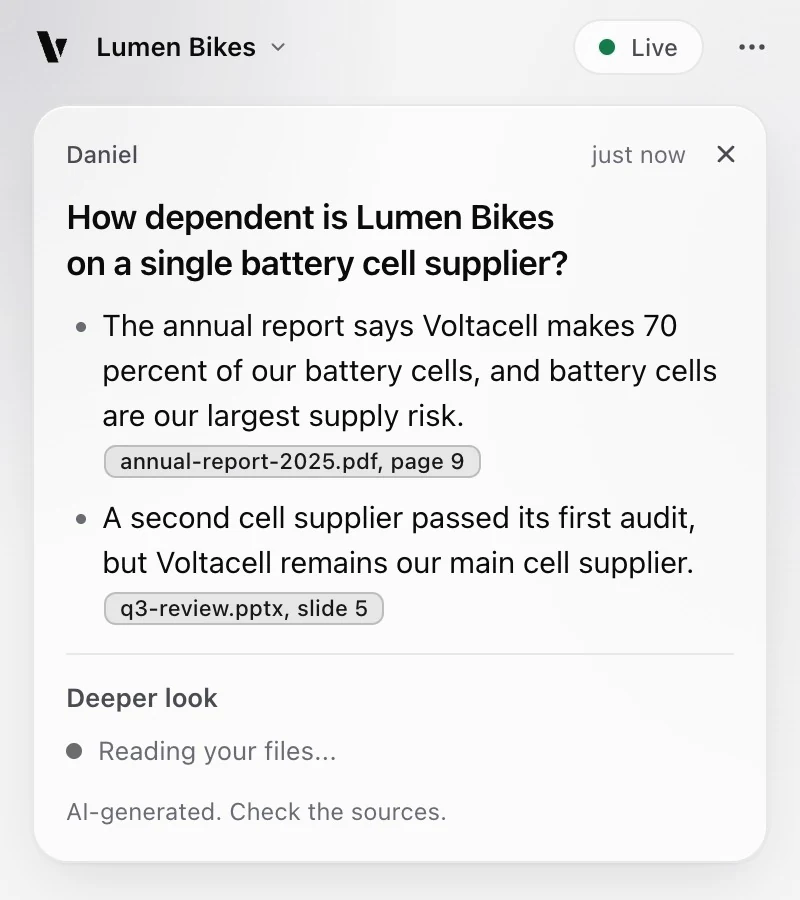
Vagmi is a Chrome extension for presenters. In a Google Meet call, it reads the live captions in your browser, and when someone asks a question it shows a short answer from your own slides, docs and repos in about 1.4 seconds, with the page, slide or line it came from. No bot joins the call.
What works in Google Meet
-
Captions turn on for you
When you join, Vagmi turns on Meet's live captions and reads them as people speak. A small button at the top of the meeting page says "listening".
-
It knows who asked
The answer shows the name of the person who asked, from the captions, so you can reply to them by name.
-
Your slides can cover the call
It keeps working when the Meet tab is in the background or behind full-screen slides.
-
Ask it yourself
Press Option+Shift+A (Alt+Shift+A on Windows) to answer the last thing the audience said, or type a question in the panel.
-
Prepared answers
Prepare the likely questions before the call. A matching question gets its full answer right away.
-
Safe screen sharing
Share a tab or the window of your slides. Vagmi shows a red warning when you share your whole screen or a window, so nobody sees the panel by mistake.
Set up in 3 steps
-
Add it to Chrome and sign in
Sign in with your email or with Google. You start on the Free plan, with no card and no API key.
-
Add your material
Drop files into the side panel, pick a folder, or connect a GitHub repo in settings. Then ask one practice question.
-
Join the call and open the panel
Join the Meet call in Chrome and open the side panel with the toolbar icon or the "Vagmi" button at the top of the meeting page.
Limits
- It works in Meet in Chrome (version 120 or later) on a computer. It does not work in the Meet phone apps.
- It needs live captions. If it cannot turn them on, the panel tells you where to turn them on by hand. Without captions, tab audio mode can listen to the call instead.
- Vagmi launches in English. Meet must make captions in a language it supports, and search works best when the question and your material use the same language.
- Answers are AI-generated. Points from your sources cite them so you can check them. Points from general knowledge have their own color and label, and no citation.
- The Free plan has 5 free questions, one time. Pro has unlimited questions, under fair use.
Also on Microsoft Teams on the web. See pricing.